


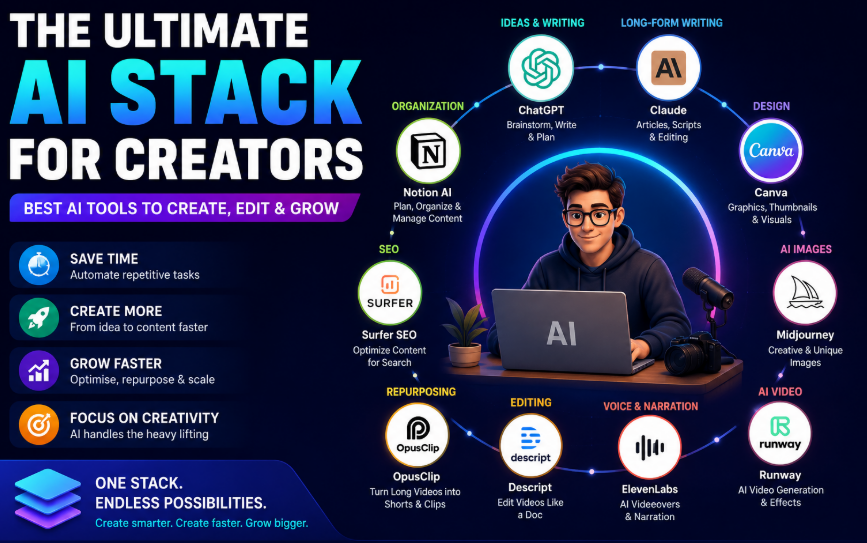
Creating great content in 2026 is no longer about using one AI tool. Modern creators need a complete AI stack for creators that can help with research, writing, images, video, voice, editing, SEO, social media, and productivity.
The good news is that you do not need dozens of subscriptions. A focused stack of four to six tools can cover most of the creative workflow. Current creator-tool guides commonly recommend combining an AI assistant such as ChatGPT or Claude with dedicated tools for design, video, audio, and repurposing.
This guide explains the ultimate AI stack for creators in 2026, what each tool is best at, and how to build a workflow that saves time without sacrificing originality.
What Is an AI Stack for Creators?
An AI stack is a collection of AI-powered tools that work together across different stages of the content-creation process.
Instead of asking one application to do everything, you assign each tool a specific job.
For example:
Idea → Research → Script → Design → Video → Voice → Editing → Repurposing → Publishing
A creator might use ChatGPT for brainstorming, Canva for graphics, Midjourney for specialized images, Runway for AI video, ElevenLabs for voice, and Descript for editing.
Research into YouTube content creation has found that creators are already using generative AI across planning, scripting, visual and audio production, editing, and publishing workflows.
Why Creators Need an AI Stack in 2026
Content creation has become a multi-format job.
A single idea may need to become:
- A blog post
- A YouTube video
- Instagram Reels
- YouTube Shorts
- LinkedIn posts
- Social graphics
- An email newsletter
- A podcast episode
- A presentation
AI can help creators transform one core idea into multiple content formats.
However, the goal should not be to automate creativity completely. AI works best as a creative assistant while the creator remains responsible for the idea, voice, accuracy, and final quality.
That is especially important as audiences and platforms become more sensitive to low-quality or obviously AI-generated content. Recent reporting has also highlighted concerns among creators about AI labeling and audience trust.
The Ultimate AI Creator Stack
Here is a practical creator stack for 2026:
| Content Task | Recommended Tool | Best For |
|---|---|---|
| Research & ideation | ChatGPT | Ideas, research, outlines |
| Long-form writing | Claude | Articles, scripts, editing |
| Graphic design | Canva | Thumbnails, social graphics |
| AI images | Midjourney | Creative visuals |
| AI video | Runway | Video generation |
| Voice | ElevenLabs | Voiceovers and narration |
| Video editing | Descript | Podcasts and video |
| Repurposing | Opus Clip | Short-form content |
| SEO | Surfer SEO or similar tools | Content optimization |
| Organization | Notion AI | Planning and content systems |
You do not necessarily need every tool listed above. The best stack depends on your content format and budget.
1. ChatGPT – The Creative Command Center
ChatGPT can serve as the central AI assistant in a creator workflow.
It can help with:
- Brainstorming content ideas
- Research
- Article outlines
- Video scripts
- Headlines
- Social captions
- Content calendars
- Email drafts
- SEO briefs
- Content repurposing
- Audience research
- Creative brainstorming
Its biggest advantage is flexibility.
Instead of using it only as a writing tool, treat it as the strategy layer of your AI creator stack.
For example, you could start with:
“I want to create a YouTube video about AI productivity tools. Give me 10 angles, identify the strongest audience problem, create an outline, and suggest a thumbnail concept.”
You can then take the resulting concept into your other creative tools.
2. Claude – Long-Form Writing and Refinement
Claude is another strong option for creators who produce long-form content.
It can be particularly useful for:
- Blog posts
- Newsletters
- Long scripts
- Ebooks
- Editing
- Rewriting
- Content briefs
- Brand voice development
A practical approach is to use one AI assistant for brainstorming and another for refinement when the project benefits from a second perspective.
Recent creator discussions also frequently mention Claude for long-form writing and structured content work.
The key is not to generate an article and publish it immediately. Give the AI your audience, tone, examples, opinions, facts, and brand guidelines.
That produces much more distinctive content.
3. Canva – The Everyday Design Tool
For many creators, Canva can cover a large percentage of everyday visual needs.
Use it for:
- YouTube thumbnails
- Instagram posts
- Pinterest graphics
- Blog graphics
- Presentations
- Infographics
- Social media carousels
- Lead magnets
- PDFs
Canva has also been expanding its AI capabilities. Its 2026 AI 2.0 update introduced more prompt-driven design functionality, including conversational creation and editing features.
For creators who want speed rather than complex professional design workflows, Canva is one of the most practical tools to keep in the stack.
4. Midjourney – Creative AI Images
Midjourney is a strong choice when you want more distinctive AI-generated imagery.
It can be useful for:
- Editorial illustrations
- Concept art
- Campaign visuals
- Creative backgrounds
- Storytelling images
- Mood boards
- Product concepts
- Thumbnail concepts
A useful workflow is to create several visual directions in Midjourney and then bring the best concept into Canva for final layout.
This gives you both creative generation and practical design control.
5. Runway – AI Video Generation
Video creators can use Runway for AI-assisted video generation and experimentation.
It can help with:
- Short cinematic clips
- B-roll concepts
- Visual effects
- Product concepts
- Social media videos
- Storytelling sequences
Runway is especially useful when you need visuals that would otherwise require filming, stock footage, or complicated production.
However, AI-generated video should complement—not replace—your own footage when authenticity matters.
6. ElevenLabs – AI Voice and Narration
Audio is another important part of the creator stack.
ElevenLabs can be used for:
- Voiceovers
- Narration
- Explainer videos
- Audiobook-style content
- Podcast production
- Multilingual voice content
A voice tool can be especially valuable for faceless YouTube channels and creators who want to produce narrated videos without recording every line themselves.
Use voice cloning responsibly and only with appropriate permission.
7. Descript – Editing Without the Traditional Timeline
Descript approaches video and podcast editing from a text-first perspective.
Instead of thinking only in terms of timelines and clips, creators can work with transcripts and text-based editing.
It can be useful for:
- YouTube videos
- Podcasts
- Interviews
- Tutorials
- Screen recordings
- Social clips
- Transcription
This can significantly simplify workflows where the spoken content is the most important part of the video.
8. Opus Clip – Turn One Video Into Multiple Pieces of Content
One of the biggest advantages of AI is content repurposing.
Suppose you record a 30-minute podcast.
Instead of publishing only the podcast, you can turn it into:
- YouTube Shorts
- Instagram Reels
- TikTok videos
- Quote graphics
- LinkedIn posts
- Blog content
- Email content
Tools such as Opus Clip are designed around this repurposing workflow. Current creator-tool comparisons commonly place Opus Clip alongside video editing and content-repurposing tools.
The principle is simple:
Create once. Distribute many times.
9. AI SEO Tools – Make Content Easier to Discover
Creating content is only half the job.
People also need to find it.
AI-powered SEO tools can assist with:
- Keyword research
- Search intent
- Content briefs
- Topic clusters
- Competitor analysis
- On-page optimization
- Content gaps
However, do not let an SEO score determine the entire article.
A perfectly optimized article that nobody enjoys reading is still a weak piece of content.
Use AI SEO tools as a guide, then prioritize:
- Search intent
- Useful information
- Original examples
- Clear structure
- Readability
- Human expertise
10. Notion AI – Organize the Creator Business
Once you start using multiple AI tools, organization becomes important.
Notion AI can help creators manage:
- Content calendars
- Ideas
- Research
- Editorial workflows
- Brand guidelines
- Campaigns
- Client projects
- Content databases
Your AI stack should not simply generate content. It should help you manage the entire process.
A simple content database could contain:
Idea → Research → Draft → Design → Edit → Scheduled → Published → Repurposed
The Best AI Stack for Different Types of Creators
Not every creator needs the same tools.
AI Stack for Bloggers
A practical blogging stack could be:
ChatGPT + Claude + Canva + SEO tool + Notion
Use ChatGPT for research and ideas, Claude for drafting and editing, Canva for graphics, an SEO platform for optimization, and Notion for content planning.
AI Stack for YouTubers
A YouTube-focused stack could be:
ChatGPT + Midjourney + Runway + ElevenLabs + Descript + Opus Clip
This covers scripting, visuals, video generation, voice, editing, and repurposing.
AI Stack for Social Media Creators
For Instagram, TikTok, LinkedIn, or Pinterest creators:
ChatGPT + Canva + image generator + video editor + repurposing tool
The focus should be speed and consistency.
AI Stack for Podcasters
A podcast-focused workflow could use:
ChatGPT + Descript + ElevenLabs + Opus Clip
ChatGPT can help with episode planning, Descript can handle editing and transcription, ElevenLabs can assist with voice work, and Opus Clip can help create short-form content.
How to Build Your AI Stack Without Overspending
One of the biggest mistakes creators make is subscribing to too many tools.
You see a new AI application and think:
“I need that too.”
Soon you have 15 subscriptions and still spend hours creating content.
Instead, start with three core tools.
Level 1: Starter Stack
ChatGPT + Canva + your existing video editor
This is enough for many beginners.
Level 2: Growing Creator Stack
ChatGPT + Canva + Midjourney + Descript + Notion
This gives you stronger capabilities across writing, design, editing, and organization.
Level 3: Professional Creator Stack
ChatGPT/Claude + Canva + Midjourney + Runway + ElevenLabs + Descript + Opus Clip + SEO tools
This is appropriate for creators producing content at higher volume.
Current 2026 stack comparisons similarly recommend focused three-to-five-tool combinations rather than subscribing to every available AI platform.
A Complete AI Content Workflow
Here is a simple workflow you can use.
Step 1: Find the Idea
Start with your audience’s problems.
Ask:
- What are people struggling with?
- What questions are they asking?
- What topics are trending?
- What can I explain better than existing content?
Use ChatGPT or another research assistant to expand your ideas.
Step 2: Research
Collect reliable information, examples, statistics, and expert perspectives.
Do not blindly trust AI-generated facts.
Verify important claims against authoritative sources.
Step 3: Create the Core Content
Write the main article, script, podcast outline, or video.
Give AI enough context to understand your:
- Audience
- Tone
- Experience
- Brand
- Goals
- Examples
Step 4: Create Visuals
Use Canva for practical designs and Midjourney or another image generator for more customized visuals.
Step 5: Produce Video and Audio
Use tools such as Runway, ElevenLabs, and Descript depending on your workflow.
Step 6: Repurpose
Turn your main piece into multiple formats.
For example:
1 blog → 1 YouTube script → 5 Shorts → 10 social posts → 1 newsletter → 5 graphics
Step 7: Publish and Analyze
Track what your audience actually responds to.
Look at:
- Click-through rate
- Watch time
- Engagement
- Shares
- Comments
- Search traffic
- Conversions
Then use those insights to improve the next piece.
AI Should Amplify Your Creativity, Not Replace It
The biggest mistake is treating AI as an autopilot.
If everyone uses the same prompts, models, templates, and stock AI visuals, content can start looking and sounding identical.
Your competitive advantage is therefore not simply access to AI.
It is your:
- Experience
- Opinions
- Personality
- Expertise
- Storytelling
- Taste
- Original research
- Understanding of your audience
AI should make those strengths easier to express.
Common Mistakes When Building an AI Creator Stack
Using Too Many Tools
More tools do not automatically mean better content.
Start small.
Publishing AI Output Without Editing
AI-generated content still needs human review.
Check facts, tone, examples, originality, and usefulness before publishing.
Optimizing Only for Algorithms
SEO and social algorithms matter, but audiences matter more.
Create something people genuinely want to read, watch, or share.
Ignoring Brand Voice
Create a clear style guide that tells your AI tools:
- Who you are
- Who your audience is
- How you communicate
- Words you use
- Words you avoid
- Your preferred structure
Forgetting Copyright and Consent
Be careful with copyrighted material, cloned voices, likenesses, and AI-generated assets.
Responsible AI use is becoming increasingly important as platforms and audiences pay more attention to authenticity and AI-generated content.
The Future of AI for Creators
The creator stack is moving toward more integrated workflows.
Instead of opening ten separate applications, creators will increasingly be able to move from an idea to finished content through connected AI systems.
Adobe, for example, announced a ChatGPT integration in August 2026 that gives users conversational access to more than 70 tools across Photoshop, Lightroom, Premiere, Illustrator, InDesign, Acrobat, and other Adobe applications.
That points toward a future where AI becomes less about individual tools and more about connected creative workflows.
The best creators will not necessarily be the people using the most AI.
They will be the people who know where AI adds value and where human creativity matters most.
Final Thoughts
The ultimate AI stack for creators in 2026 does not need to contain 20 different applications.
A focused stack can cover nearly everything:
ChatGPT or Claude for thinking and writing
Canva for everyday design
Midjourney for creative imagery
Runway for AI video
ElevenLabs for voice
Descript for editing
Opus Clip for repurposing
SEO tools for discoverability
Notion AI for organization
The exact combination depends on what you create.
If you are a blogger, prioritize writing, research, SEO, and design. If you are a YouTuber, invest more heavily in video, voice, editing, and repurposing. If you are a social creator, focus on rapid design and short-form production.
The goal is not to automate your creativity.
The goal is to remove repetitive work so you have more time to be creative.
FAQs
What is the best AI stack for creators in 2026?
For most creators, a strong starting stack is ChatGPT or Claude, Canva, a video editor such as Descript, and a tool for content repurposing. Add specialized image, video, voice, or SEO tools only when your workflow requires them.
How many AI tools does a creator really need?
Most creators can start with three to five tools. Adding more tools only makes sense when each one solves a specific problem.
Is AI going to replace content creators?
AI is more likely to change the creator workflow than eliminate the need for creators. Original ideas, expertise, personality, storytelling, and audience relationships remain important.
What is the best AI tool for writing content?
ChatGPT and Claude are both strong general-purpose choices. The best option depends on your preferred workflow, content type, and need for research, editing, or long-form writing.
What is the best AI tool for video creators?
Runway is useful for AI-generated video, while Descript is useful for editing and podcast/video workflows. Opus Clip is particularly useful when the goal is repurposing long videos into short-form content.
Should I pay for multiple AI subscriptions?
Not necessarily. Start with the smallest stack that solves your current problems. Upgrade only when a paid feature saves enough time or improves your content enough to justify the cost.
Conclusion
The modern creator does not need to become an AI expert.
You simply need a smart system.
Choose one strong AI assistant, one design platform, one video solution, and specialized tools only where they provide real value. Build a repeatable workflow around those tools, keep your human perspective at the center, and continuously measure what actually works.
The best AI creator stack is not the one with the most tools. It is the one that helps you create better content, faster, while keeping your unique voice intact.